> ## Documentation Index
> Fetch the complete documentation index at: https://docs.finhost.io/llms.txt
> Use this file to discover all available pages before exploring further.
# Reports
> The Reports provides a consolidated view of key business metrics for White Label applications. It is designed primarily for the **management team** of clients, offering insight into **financial performance, onboarding progress, and reconciliation data**.
Reports are divided into three subsections:
* **Dashboard**
* **Onboarding**
* **Reconciliation**
***
## 1. Data Storage & Updates
To ensure fast retrieval and accuracy:
* Metrics are **calculated daily** for the previous day (UTC 0).
* Current-day metrics are updated **in real-time** when requested by the Core Admin.
* Data must always be up-to-date at the moment of the request.
* Historical balances are available only from the date this feature is released.
***
## 2. Dashboard
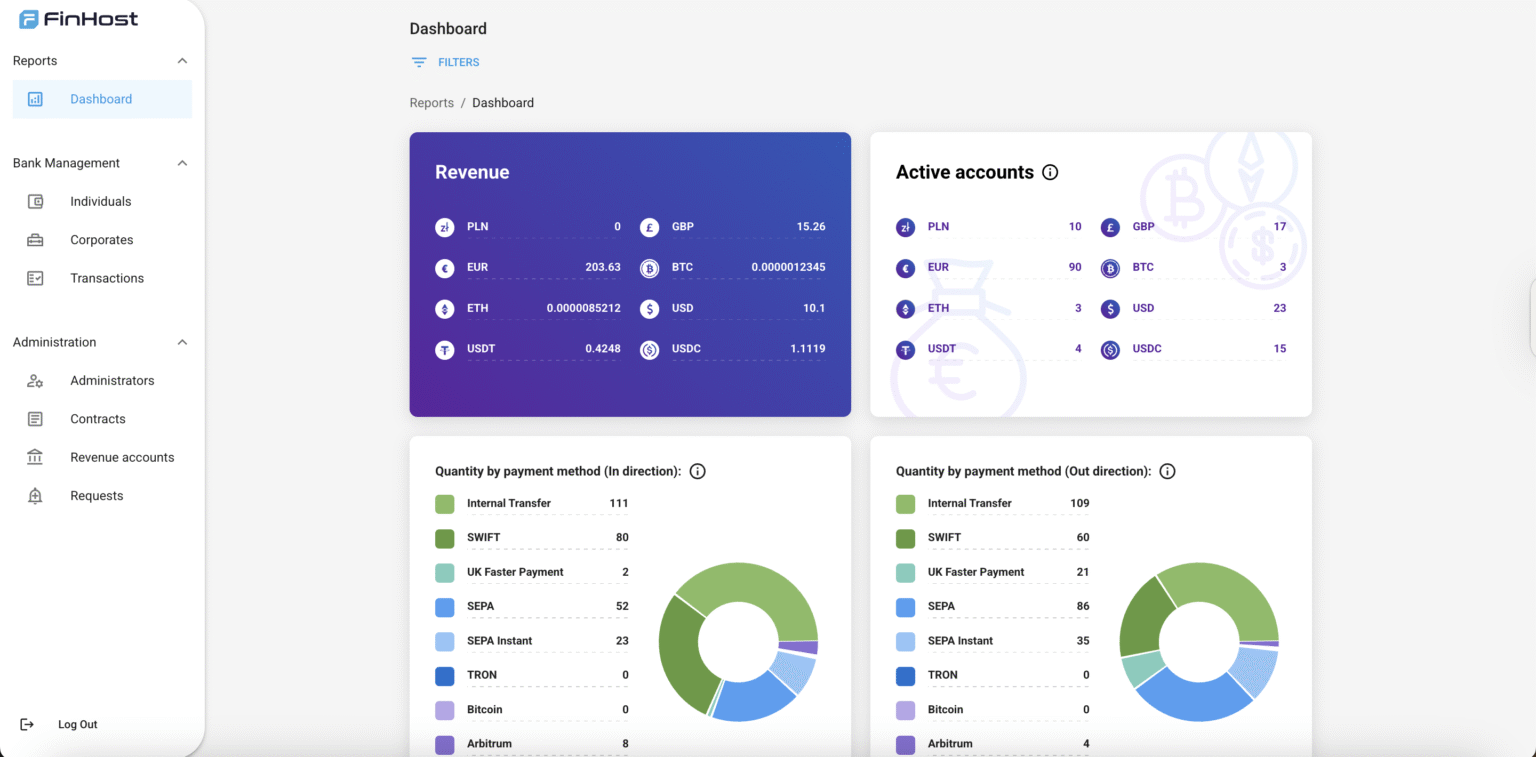
The **Dashboard** provides high-level financial and operational metrics.
### Filters
* **Period**: last 7 days, last 30 days (default), all time, or custom date picker (from–to).
* **User type**: all (default), individual, corporate.
### Metrics
#### Balances
* Shows the **sum of all balances** across the system (Available, Reserved, Current).
* Displayed **per provider** and **per currency**.
* Balances update in real time when dashboard is opened.
* Balances are also recorded daily at 00:00:00 for historical reporting.
* Balances include **revenue accounts** as well.
ℹ️ **Info text:**
* *Available Balance*: funds currently accessible for use.
* *Reserved Balance*: pending outgoing + pending incoming transactions.
* *Current Balance*: balance from completed transactions only.
* All balances are shown as of the latest date in the selected filter range.
***
#### Turnover (Total Transaction Volume)
* Cumulative flow of all **external transfers**.
* Shown per currency: EUR, GBP, USD, BTC, ETH, USDT, USDC.
#### Quantity of Transactions
* Total number of transactions through user accounts.
* Split into **incoming** and **outgoing**.
***
#### Volume by Payment Method
* Money flow by payment method and currency.
* Methods: Internal, SEPA, SEPA Instant, SWIFT, UKFP, Crypto networks, Currency Exchange.
* Split into **incoming** and **outgoing**.
#### Quantity by Payment Method
* Total number of transactions by method.
* Includes internal, fiat rails, crypto, card top-up, and currency exchange (orders).
* Split into **incoming** and **outgoing**.
ℹ️ **Info text:**\
*Only completed transactions are considered.*
***
#### Currency Exchange Volume
* Total amount of currency bought and sold.
* Tracked per currency: EUR, BTC, ETH, USDT, USDC.
***
#### Operations by Type
* Shows distribution (%) of different payment methods.
* Formula: `(Transactions of type / Total transactions) * 100%`
* Exchange = calculated by orders, not transactions.
***
#### Revenue
* Total fees collected by currency:\
EUR, GBP, USD, PLN, CAD, BTC, ETH, USDT, USDC, TRUMP, TRX.
#### Fees by Operations
* Fees collected per payment method, split by incoming/outgoing.
* Includes: SEPA, SEPA Instant, SWIFT, UKFP, Crypto networks, Currency Exchange.
***
#### AML Success Rate
* Share of transactions passing AML checks.
* Formula: `(Transactions with AML confirmed / Total transactions) * 100%`.
***
#### Active Accounts
* Number of accounts active in the selected period.
* **Fiat account** = existed during the period with valid IBAN/account number.
* **Crypto account** = had at least one transaction during the period.
ℹ️ **Info text:**
* *Active fiat accounts = accounts with IBAN/account number.*
* *Active crypto accounts = accounts with at least one transaction.*
***
 ## 3. Onboarding (UNDER CONSTRUCTIONS)
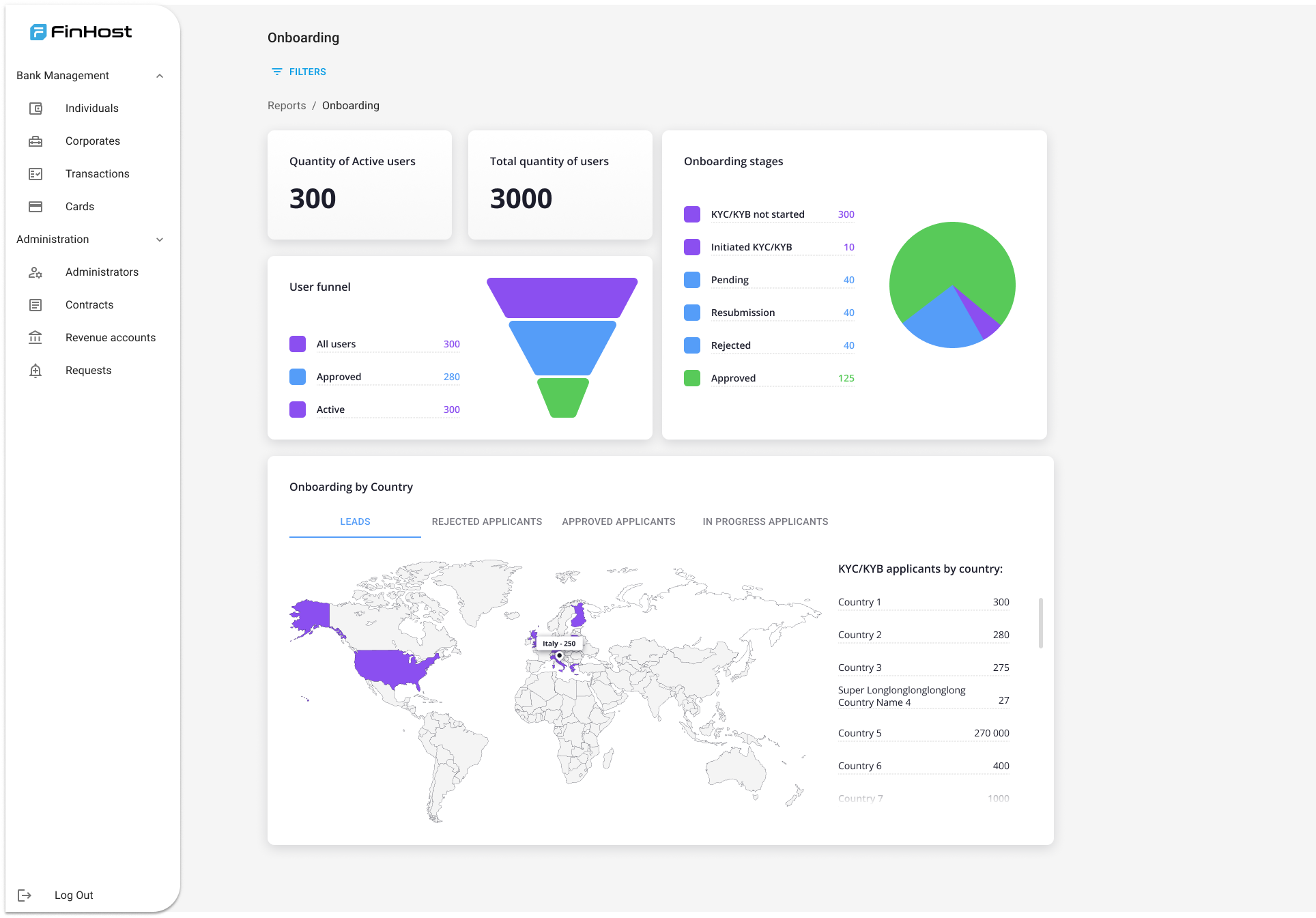
The **Onboarding** subsection tracks user progress through KYC/KYB.
### Filters
* **User type**: all (default), individual, corporate.
### Metrics
#### Total Group
* **Total Quantity of Users**: fully verified users with contract assigned.
* **Active Users**: non-suspended users with at least one transaction in the last 30 days.
#### KYC/KYB Procedure
* **Not Started**: users with status `unconfirmed`.
* **Initiated**: users who opened KYC/KYB but did not complete.
* **Pending**: documents submitted, waiting for review.
* **Resubmission**: additional documents requested.
* **Approved**: fully verified.
* **Rejected**: permanently rejected.
#### Applicants by Country
* **Leads**: users with unconfirmed status.
* **In Progress Applicants**: initiated, pending, or resubmission.
* **Rejected Applicants**: rejected.
* **Approved Applicants**: confirmed.
***
## 3. Onboarding (UNDER CONSTRUCTIONS)
The **Onboarding** subsection tracks user progress through KYC/KYB.
### Filters
* **User type**: all (default), individual, corporate.
### Metrics
#### Total Group
* **Total Quantity of Users**: fully verified users with contract assigned.
* **Active Users**: non-suspended users with at least one transaction in the last 30 days.
#### KYC/KYB Procedure
* **Not Started**: users with status `unconfirmed`.
* **Initiated**: users who opened KYC/KYB but did not complete.
* **Pending**: documents submitted, waiting for review.
* **Resubmission**: additional documents requested.
* **Approved**: fully verified.
* **Rejected**: permanently rejected.
#### Applicants by Country
* **Leads**: users with unconfirmed status.
* **In Progress Applicants**: initiated, pending, or resubmission.
* **Rejected Applicants**: rejected.
* **Approved Applicants**: confirmed.
***
 ## 4. Reconciliation
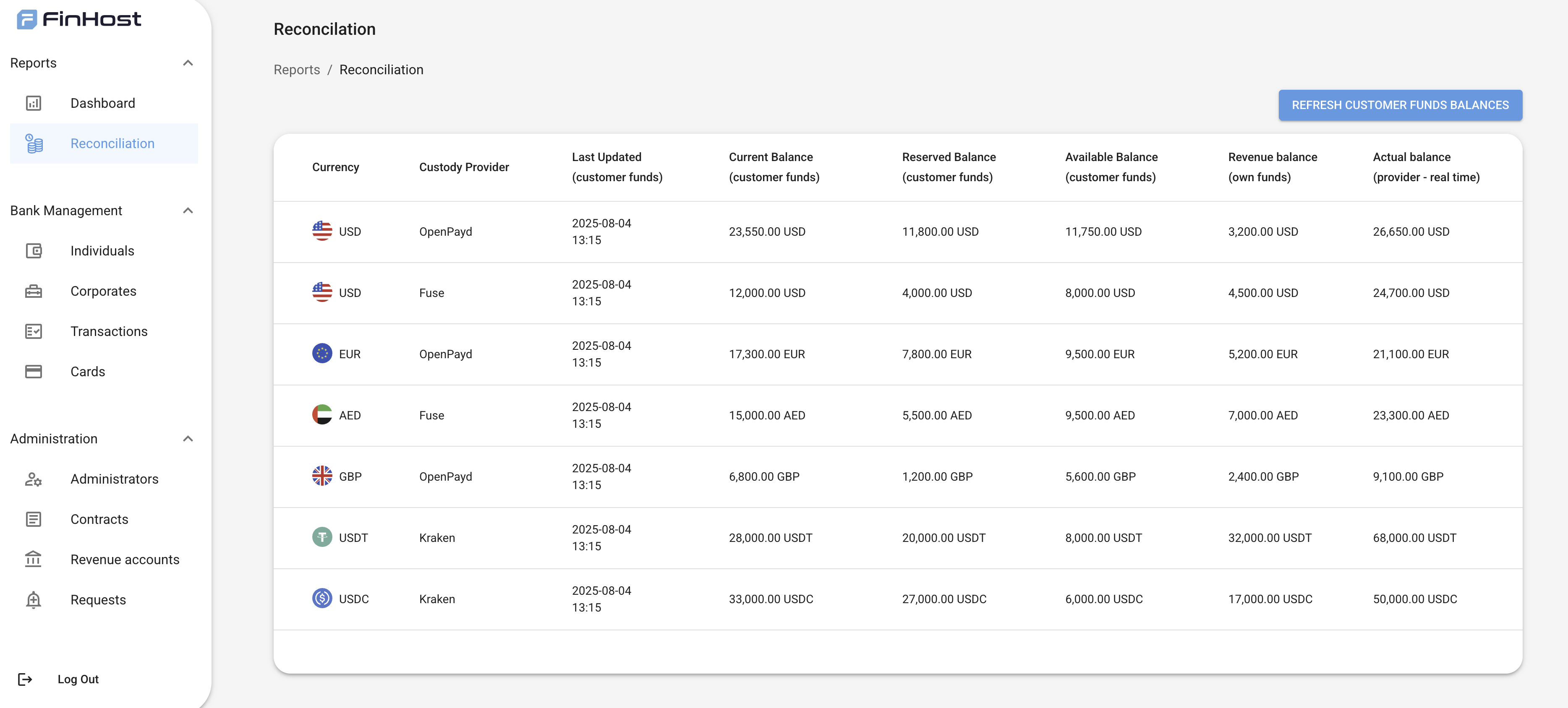
The **Reconciliation tab** compares internal customer funds data with the actual balances reported by custody providers.\
It helps Admins ensure accuracy of funds and quickly detect mismatches between internal and provider records.
### Data Displayed
For each **currency + custody provider** pair, the table shows:
* **Currency**
* **Custody Provider** (e.g., bank, PSP, or crypto custodian)
* **Last Updated** (timestamp of last data sync for customer funds)
* **Current Balance (customer funds)** → based on completed transactions
* **Reserved Balance (customer funds)** → pending incoming + pending outgoing transactions
* **Available Balance (customer funds)** → immediately spendable balance
* **Revenue Balance (own funds)** → system’s own revenue accounts for that currency
* **Actual Balance (provider – real time)** → latest balance fetched directly from provider
### Behavior
* **Refresh button** allows Admins to fetch balances in real-time from custody providers.
* Balances are displayed per **currency** and **provider** (e.g., EUR/OpenPayd, USDT/Kraken).
* Revenue accounts are included to show system-owned funds separately from customer funds.
* Discrepancies between **customer funds balances** and **provider balances** indicate reconciliation issues.
### Example Table
## 4. Reconciliation
The **Reconciliation tab** compares internal customer funds data with the actual balances reported by custody providers.\
It helps Admins ensure accuracy of funds and quickly detect mismatches between internal and provider records.
### Data Displayed
For each **currency + custody provider** pair, the table shows:
* **Currency**
* **Custody Provider** (e.g., bank, PSP, or crypto custodian)
* **Last Updated** (timestamp of last data sync for customer funds)
* **Current Balance (customer funds)** → based on completed transactions
* **Reserved Balance (customer funds)** → pending incoming + pending outgoing transactions
* **Available Balance (customer funds)** → immediately spendable balance
* **Revenue Balance (own funds)** → system’s own revenue accounts for that currency
* **Actual Balance (provider – real time)** → latest balance fetched directly from provider
### Behavior
* **Refresh button** allows Admins to fetch balances in real-time from custody providers.
* Balances are displayed per **currency** and **provider** (e.g., EUR/OpenPayd, USDT/Kraken).
* Revenue accounts are included to show system-owned funds separately from customer funds.
* Discrepancies between **customer funds balances** and **provider balances** indicate reconciliation issues.
### Example Table